

AnswerKit settings, one by one
The configuration page (Modules > Module Manager > AnswerKit > Configure) has three panels: Status, Display and Where FAQs are used. Each save clears the FAQ cache: the change shows on the shop at once.
Status panel
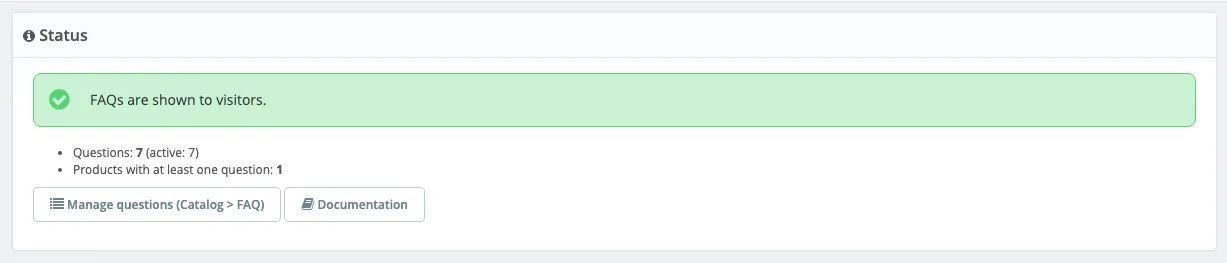
It tells you at a glance what a visitor sees (green: FAQs shown, orange: FAQs hidden), how many questions exist (and how many are active) and how many products have at least one question. Manage questions (Catalog > FAQ) opens the central page, Documentation opens this guide.
Display panel
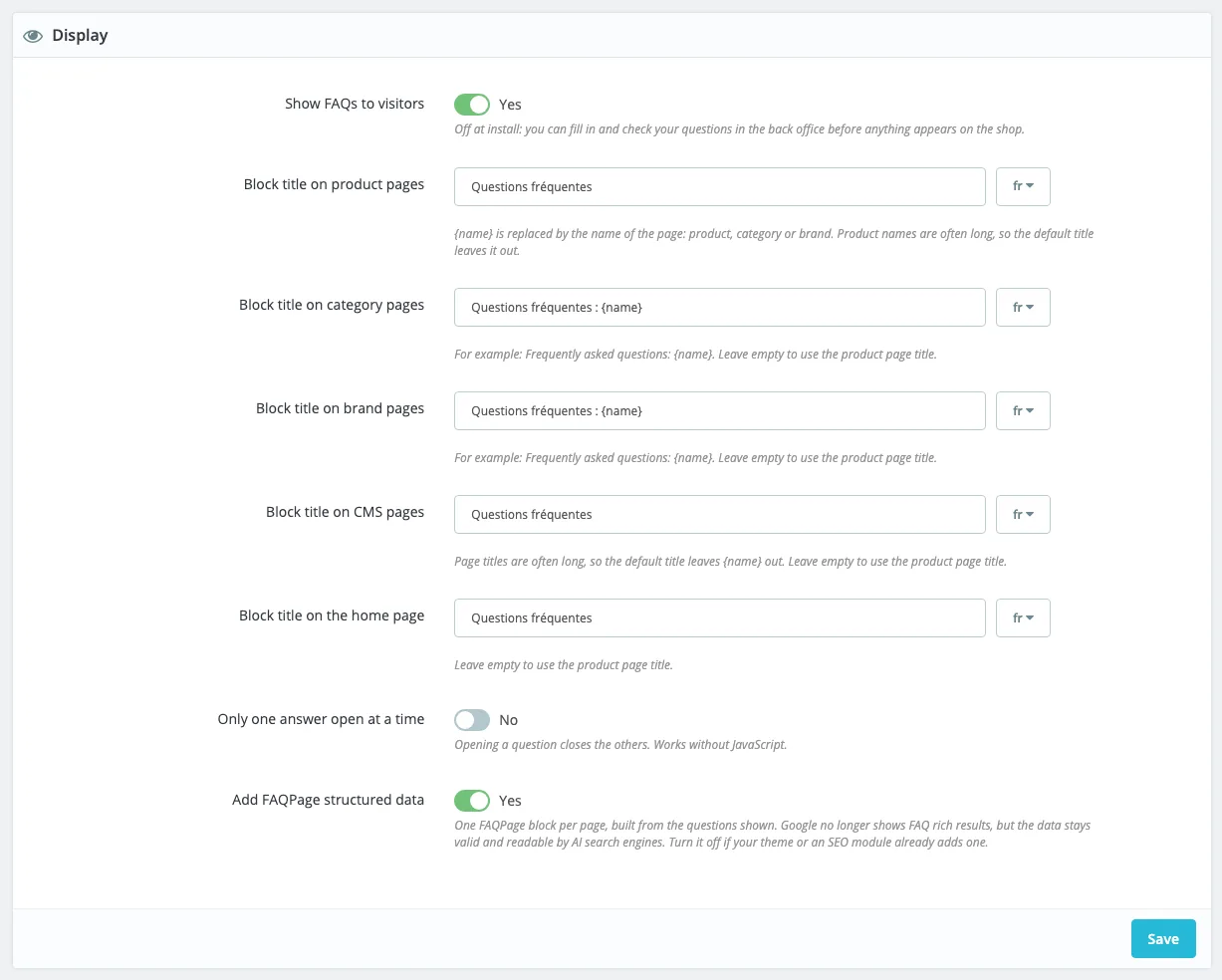
Show FAQs to visitors
The main switch. No after installing: you fill in and check your questions in the back office, nothing shows on the shop.
- When to change it: when your first questions are ready.
- Recommended: Yes in production. Set it back to No to hide every FAQ at once without losing anything.
Block title on product pages
The title shown above the questions, per language (pick the language with the button on the right of the
field). Frequently asked questions by default. {name} is replaced by the name of the page.
- With the recommended location (Own block after the description), this is the name of the tab or of the section the theme creates.
- Recommended: keep Frequently asked questions. Product names are often long,
{name}makes the tab heavy.
Block title on category pages
Frequently asked questions: {name} by default, which gives for example “Frequently asked questions: Clothes”. Leave it empty to use the product page title.
- Recommended: keep
{name}. A title that carries the category name is clearer for visitors and for search engines.
Block title on brand pages
Same as categories: Frequently asked questions: {name}, with the brand name.
Block title on CMS pages
Frequently asked questions by default, without {name}: CMS page titles are often long. Leave it empty
to use the product page title.
Block title on the home page
Frequently asked questions by default. Leave it empty to use the product page title.
Only one answer open at a time
Yes: opening a question closes the others. No: visitors can open several. Works without JavaScript, with the browser’s native accordion (very old browsers simply leave several answers open).
- Recommended: No for a short FAQ (fewer than 6 questions), Yes for a long one, especially on phones.
Add FAQPage structured data
Adds a FAQPage JSON-LD block to the page, built from the questions shown, one per page. Yes after installing.
- When to turn it off: when your theme or an SEO module already adds a FAQPage block on the same pages. Two FAQPage blocks on one page are an error for testing tools.
- Recommended: Yes. Google no longer shows FAQs in its results, but the markup stays valid and readable by other engines. Everything is explained in Structured data.
Where FAQs are used panel
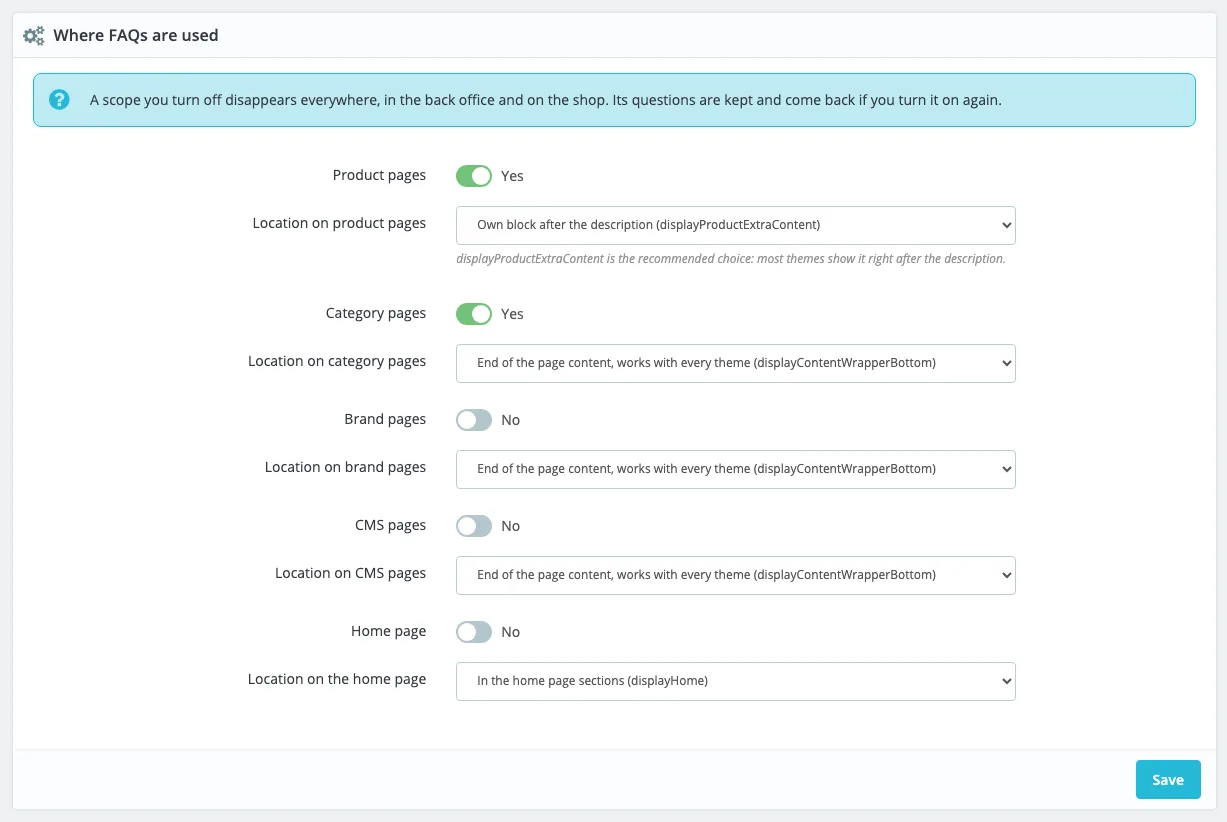
Each page type (a scope) has its own switch and location. A scope you turn off disappears everywhere: no more panel in the back office, nothing on the shop. Its questions are kept and come back if you turn it on again.
Product pages
Yes after installing. Turn it off only if you use AnswerKit for categories or CMS pages only. Questions linked to All products depend on this scope too.
Location on product pages
| Choice | Where the block shows |
|---|---|
Own block after the description (displayProductExtraContent) | A tab or section of the theme, after the description. Recommended: most themes show it (a tab in Classic, a collapsible section in Hummingbird). |
Bottom of the product page (displayFooterProduct) | Below the product content, before related products. |
Under the add to cart button (displayProductAdditionalInfo) | In the buy column. Keep it for 2 or 3 short questions. |
Reassurance block (displayReassurance) | In the reassurance block, if the theme shows it. |
| None, the theme places the widget | Nothing is placed automatically: your theme shows the FAQ wherever it wants with {widget name='answerkit'}. See Advanced uses. |
Category pages
No after installing. Turn it on to show questions about a category (see Advanced uses). The FAQ only shows on the first page of the listing: pages 2, 3… would repeat the same questions under another address.
Location on category pages
| Choice | Where the block shows |
|---|---|
End of the page content, works with every theme (displayContentWrapperBottom) | After the product list. Recommended. |
Top of the page content, works with every theme (displayContentWrapperTop) | Before the product list. Useful for a very short FAQ. |
Below the product list, Classic theme (displayFooterCategory) | Specific to Classic and its children; some themes do not show it. |
Above the product list, Classic theme (displayHeaderCategory) | Same, above the list. |
| None, the theme places the widget | Placed by the theme. |
Brand pages and location
Like categories: No after installing, first page of the listing only, recommended location End of the page content.
CMS pages and location
No after installing. Location End of the page content (recommended) or Top of the page content, which work with every theme.
Home page and location
No after installing. Location In the home page sections (displayHome, recommended with Classic and
Hummingbird), or End / Top of the page content if your theme does not show displayHome.
Values after installing
| Setting | Value |
|---|---|
| Show FAQs to visitors | No |
| Only one answer open at a time | No |
| FAQPage structured data | Yes |
| Product pages | Yes, own block after the description |
| Category, brand, CMS and home pages | No |
Updating the module never changes your settings.