

Advanced uses
With AnswerKit, a question is written once and can show in several places: on several products, on a category, on the whole catalog. Fix the answer and it is fixed everywhere.
The central page
Catalog > FAQ (AnswerKit) lists every question of the shop, with where each one is shown. The search box filters the list as you type.
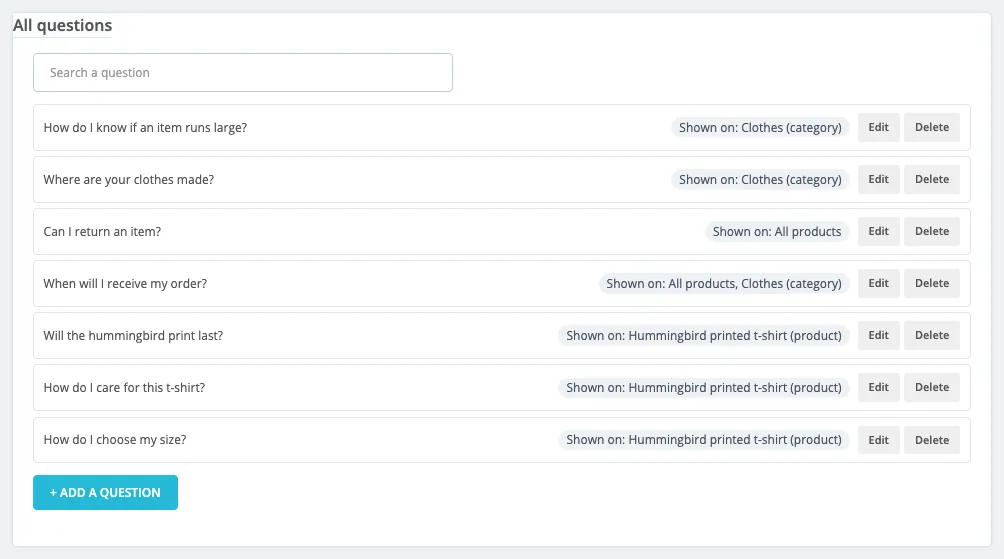
Click Edit to open a question: besides the text, the central page shows the Shown on list and lets you add or remove locations.
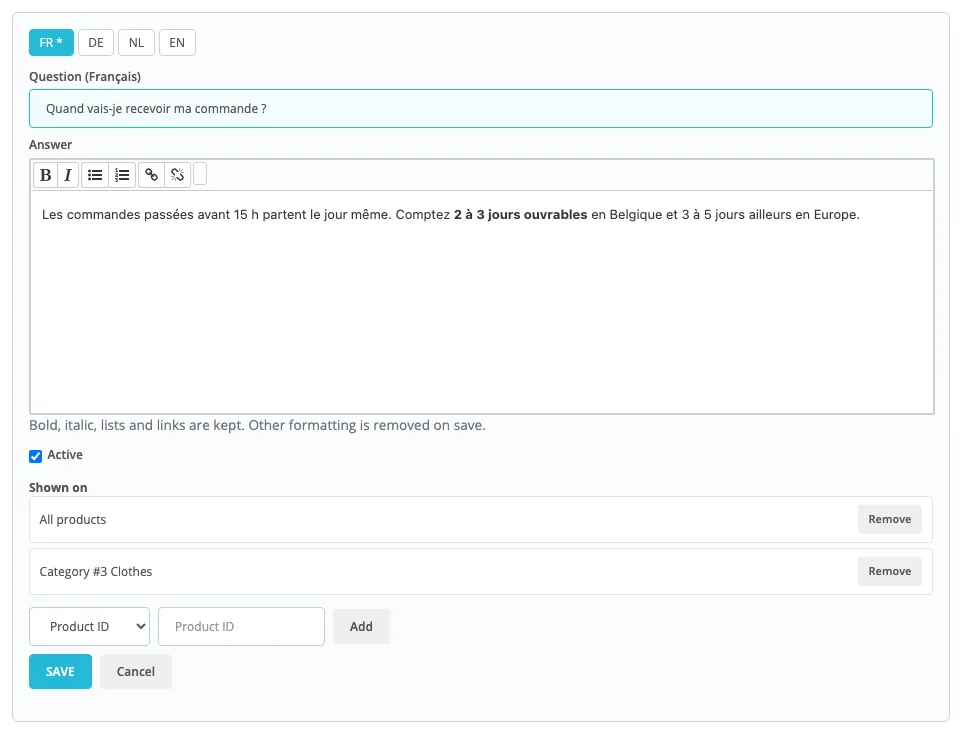
To add a location: pick the type in the list (Product ID, Category, Brand, CMS page, Home page, All products), then the product, category or page, and click Add. Only the types whose scope is on in the settings are offered.
One answer for every product
Delivery, returns, warranty, payment: link the question to All products. It shows on every product page, after the product’s own questions. In the FAQ tab of a product, these questions are listed read-only under Shown on every product (added from the FAQ page).
One question on several products
Same question for three models of the same range? Write it once, then add the three products to Shown on. The Also used on other pages badge reminds you of it in the FAQ tab of each product. If you delete a shared question from a product, AnswerKit asks whether you only want to remove it from this product: the other products keep it.
Category FAQ
- Turn Category pages on in the settings.
- In the central page, create the question and add the Category to Shown on.
The FAQ shows on that category page, first page of the listing only. It does not flow down to subcategories or to product pages: it is a FAQ about the category, for the questions people ask before choosing a product (“How do I choose?”, “What is the difference between…?”).
Brand FAQ
Same idea with Brand pages and the Brand type: ideal for the warranty, after-sales service or compatibility of one manufacturer.
FAQ on a CMS page
Turn CMS pages on, then link the question to the CMS page you want. Handy to turn your “Delivery” or “Help” page into a real FAQ, with its structured data, without touching the page content.
FAQ on the home page
Turn Home page on and link the question to the Home page type. Keep 4 to 6 questions that reassure a new visitor: who you are, delivery times, returns, payment.
Order of the questions
- On a product page: drag and drop in the product’s FAQ tab, or use the arrows.
- On other pages: questions follow the order in which they were linked. To move one, remove it and add it
again (it goes last), or set its
positionthrough the API. - 100 questions per page at most.
Turn a question off without deleting it
Untick Active in the editor: the question disappears from the shop but keeps its texts and locations. Useful for a seasonal offer.
CSV export and import

Export all questions (CSV) downloads a file that opens in Excel, LibreOffice or Google Sheets. It is also the best backup of your FAQs.
The format, one row per question and per language:
| Column | Content |
|---|---|
item_ref | A free reference. Rows with the same reference make one question (one row per language). |
active | 1 shown, 0 turned off |
links | Where to show it, separated by |: product:12, category:5, manufacturer:3, cms:4, home, all |
lang | Language code of the shop: en, fr, nl, de… |
question | The question |
answer | The answer, plain text or with simple tags (<p>, <strong>, <ul>, <li>, <a>) |
Example:
item_ref;active;links;lang;question;answer
size;1;product:12|product:13;en;How do I choose my size?;Take your usual size.
size;1;product:12|product:13;fr;Comment choisir ma taille ?;Prenez votre taille habituelle.
delivery;1;all;en;When will I receive my order?;Within 2 to 3 working days.
Good to know:
- UTF-8 file,
;separator (a comma works too), 5 MB and 20,000 rows at most. - The import adds questions: it does not update existing ones. To replace the FAQ of the products in the file, tick Replace the existing questions of the products listed in the file. A question removed this way that is no longer shown anywhere is deleted.
- A report lists the skipped rows (unknown language, product not found…).
- For regular updates from a PIM or an ERP, use the WebService API instead.
Place the FAQ yourself in the theme
If none of the offered locations suits you, choose None, the theme places the widget for that page type, then add this line to the theme template, where you want it:
{widget name='answerkit'}The widget detects the page (product, category, brand, CMS page or home page) and shows the FAQ with its title. Keep None as the location for that page type, or the FAQ would show twice.
Change the colors
The accordion follows the theme colors. To change them, add this to the custom CSS of your theme:
.answerkit {
  --ak-accent: #1a7f7a;   /* open question, icon */
  --ak-border: #e3e9ef;   /* separator lines */
  --ak-text: inherit;     /* question text */
}